Mostrando las entradas con la etiqueta AWS. Mostrar todas las entradas

miércoles, diciembre 13, 2023

How I got the certification, AWS Certified Solutions Architect - Associate

Course

  • I did the course of learn.cantrill.io its longer than others, but you learn a lot about AWS. 
  • I took a lot of notes, and use them latter to study.

Practice Exams

I did the practice exams from TD(tutorialsdojo.com) mainly in review mode, and got these results
1° attempt timed Mode Set 1    71
2° attempt timed Mode Set 1    93
1° attempt  review Mode Set 2    88
1° attempt  review Mode Set 3    69
1° attempt  review Mode Set 4    74
1° attempt  review Mode Set 5    69
1° attempt  review Mode Set 6    72
1° attempt  review Mode Set 7    71
Final test 91

I didn't see improvements in my scores in the first attempts. I only saw an improvement when I did the final test and got a 91. After that, I started my second attempts, and got these results
2° attempt timed Mode Set 2    88
2° attempt timed Mode Set 3    89

After getting those scores, I decided I was ready for the exam. I scheduled it and fortunately approve it with a score of 836/1000. I found the certification exam very similar to the practice exams, but the first attempt on the practice exams is more challenging.

Review mode is perfect for the first attempt on the practice exams because it gives you immediate feedback that allows you to learn faster from your mistakes and fill your knowledge gaps. If you're worried about the timing, use an external stopwatch while doing the review mode. I used the android app Easy Stopwatch.

A 30-minute exam extension is available upon request to non-native English speakers when taking an exam in English https://aws.amazon.com/certification/policies/before-testing/

Recommendations

  • Do all the questions in all the practice exams in review mode. Don't obsesses about the scores. 
  • The final test score is the closest to what you will get in the certification exam.

miércoles, septiembre 27, 2023

Delete an AWS CloudFormation stack that has a DELETE_FAILED resource.

Click again the delete button, this time you will be able to skip the DELETE_FAILED resource.

Important: To avoid unnecessary charges, you must manually delete the resources that are retained when the stack is deleted.

https://repost.aws/knowledge-center/cloudformation-stack-delete-failed

sábado, septiembre 09, 2023

How-to check AWS current month costs

You're seeing the charges until yesterday. There is a delay of 24 hours between the usage of a resource and AWS showing its cost to you.


Current month costs

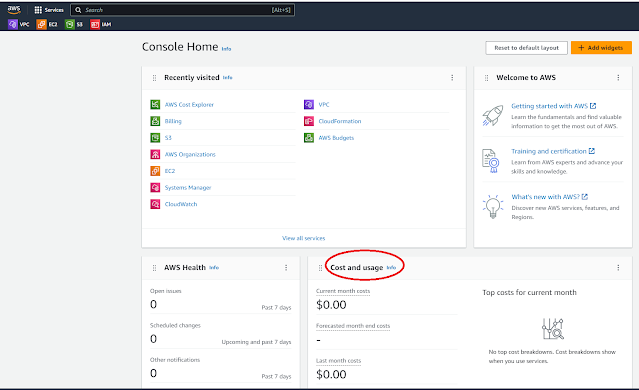
Go to the main page and check the Cost and Usage widget


Charges per day

Click the link Go to AWS Cost Management, and you will see your charges per day.


Click on View in Cost Explorer and then on Dimension select Service, and you will see the charges per day and per Service. Other useful options are usage type and API Operation.


Current month costs detailed per service and account

Go to AWS Billing > Bills and check the tabs Charges by service and Charges by account


martes, septiembre 05, 2023

NOT in the AWS free tier

It's very hard to understand what is and what is not in the AWS free tier. This is a list of the things I was charged using AWS free tier, and so after that I learned that are not part of it

VPC

  • NAT gateway
  • VPC Endpoint

EC2

  •  Elastic IP

  • Backup Storage

Data transfer

  • EBS snapshot copy between AWS Regions


See also

Please fix the AWS Free Tier before somebody gets hurt

lunes, agosto 28, 2023

How to try to avoid unexpected charges when using AWS

In AWS you see the charges until yesterday. There is a delay of 24 hours between the usage of a resource and AWS showing its cost to you.

Create a budget

Go to AWS Billing > Budgets and create a budget to receive notifications if your spending reaches it.


Change the Billing preferences

Go to AWS Billing > Billing preferences and active 

  • PDF invoices delivery by email
  • AWS Free Tier alerts
  • CloudWatch billing alerts


Check the current month costs

On a constant basis go to the main page, and on the Cost and Usage widget check your current month costs and forecasted month-end costs. Also think about deleting all the widgets, but this one.


Usage and charge information is shown after 24 hours

"The Billing and Cost Management console takes about 24 hours to update usage and charge information for active resources." https://repost.aws/knowledge-center/resources-unexpected-charges


See also

NOT in the AWS free tier